
Update 2024.12.11: This feature is now out of beta and available for everyone! https://openai.com/index/introducing-canvas/
ChatGPT just launched a new feature in beta they’re calling Canvas, and this is a killer feature that I’m immediately in love with. This is a great implementation of “AI as an assistant” – Not a tool for “Write me a whole thing from scratch”, but instead you write it yourself and then have the AI act as an editor. You could already do that, but it was a bit clunky in the chat UI. The Canvas UI is much cleaner for this, making it an incredible tool for brainstorming, iterating, and improving content. It connects the dots on many of ChatGPT’s use cases, removing the friction of figuring it out yourself and turning it into an easy-to-use assistant for your writing process.
Essentially what Canvas does is give you a word processor-like interface for content separate from the chat itself. You can write and edit directly in that content; if you want to change a sentence, you just put your cursor there and type, just like you would in a word processor. On the side is the chat style UI where you can ask or tell the AI stuff about the whole doc (or anything else). My favorite feature is the line-by-line AI integration, allowing you to select a line and work with just it. Suggest improvement to just this line, move it somewhere else, insert another paragraph that explains this concept, format it as a list, etc.
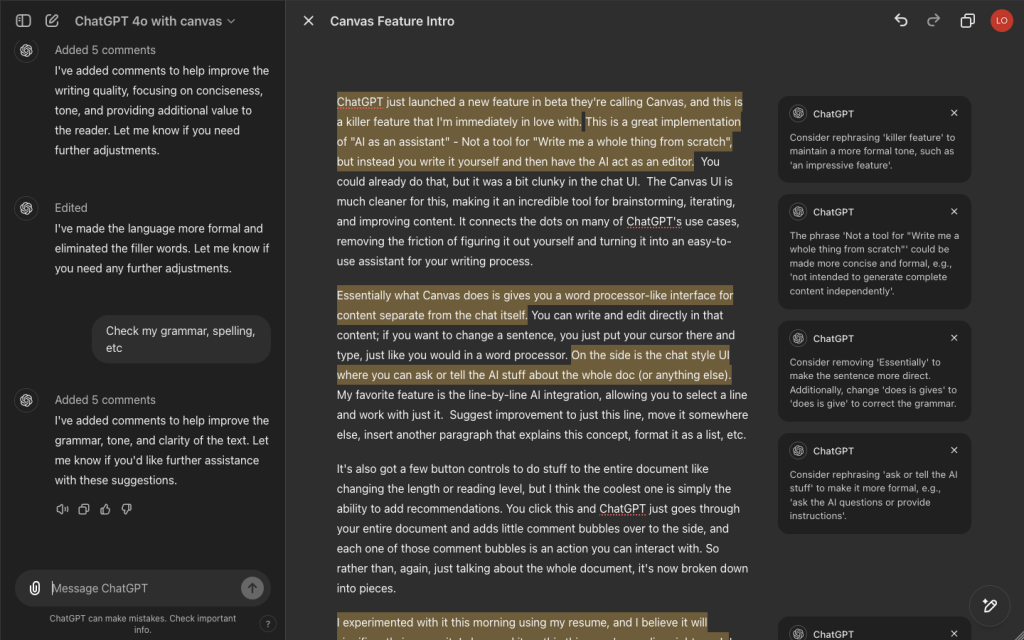
It’s also got a few button controls to do stuff to the entire document like changing the length or reading level, but I think the coolest one is simply the ability to add recommendations. You click this and ChatGPT just goes through your entire document and adds little comment bubbles over to the side, and each one of those comment bubbles is an action you can interact with. So rather than, again, just talking about the whole document, it’s now broken down into pieces.
I experimented with it this morning using my resume, and I believe it will significantly improve it. I also used it on this thing you’re reading right now! I started by just dictating using the voice interface, took that into the canvas and then asked it for suggestions on how to make it better, and then just went through and kind of tweaked the suggestions (you can see the evolution in the screenshots).
If you want to check out the comparison, here’s the original raw text for this article straight out of my brain:
ChatGPT just launched a new feature in beta they’re calling Canvas, and this is a killer feature that I’m immediately in love with. It really does a great job of connecting the dots on a lot of the great use cases for ChatGPT, and kind of removes the friction of having to figure it out yourself, and instead just turns it into an easy-to-use tool for brainstorming, iterating, and improving content that you’re writing.
It’s a lot like a feature that Anthropic already had they call Artifacts, but so far I’m really liking the ChatGPT implementation because it feels just a little bit cleaner, plus Anthropic has really low usage limits, so on the higher usage limits in ChatGPT+, I think this is a much more useful feature here. It is currently just a plus feature, meaning you have to be paying for their subscription. They also have it labeled as beta, so take that into consideration, but I do strongly recommend you play with it.
Essentially what Canvas does is gives you sort of a word processor-like interface, so rather than saying, hey ChatGPT, you know, make me a story about a shark, and it just being in the chat, and you keep having to, you know, go back up and down in the chat, it takes your story there and puts it over on the side in its own frame that you can edit directly, so whether you’re starting with something that it created or you’re writing your own thing from scratch, you’ve got all of the text and you can write directly into it, so if you want to change the title, you just change the title like you would in a word processor. It doesn’t regenerate the whole thing for you, but then you’ve also got like line-by-line AI integration, so you can select a line and do something with it, like, hey ChatGPT, I don’t think this line makes sense, what do you suggest? Or insert another paragraph that explains this concept. It’s also got a few controls to do stuff to the entire document, lengthening, shortening, but I think the coolest one is simply the ability to add recommendations. You click this and ChatGPT just goes through your entire document and adds little comment bubbles over to the side, and each one of those comment bubbles is an action you can interact with, so you can, rather than, again, just talking about the whole document, it’s now broken down into pieces.
I played with it this morning a little bit with my resume. It’s gonna be huge in improving that. I also played with it on a blog article, and it’s gonna be very helpful in making changes there. I also used it on this, so this thing you’re reading right now, I started by just dictating using the voice interface. I took that into the canvas and then asked it for suggestions on how to make it better, and then just went through and kind of tweaked the suggestions.
Again, to make it clear here, I’m not talking about using ChatGPT to write something for you. This is really using it in that first pillar of AI as an assistant in the smoothest possible way. Really great feature. Definitely recommend playing with it.
I plan to try it on a lengthy technical blog post I’m working on later today. AI as an assistant!
It’s a lot like a feature that Anthropic already had they call Artifacts, which is also worth playing with, but so far I’m really liking the ChatGPT implementation more. It feels a lot cleaner and has the in-line feature, plus Anthropic has really low usage limits.
Canvas just started rolling out yesterday, and is currently only available with a ChatGPT Plus subscription. They also have it labeled as beta, so take that into consideration, but I do strongly recommend you try it out!